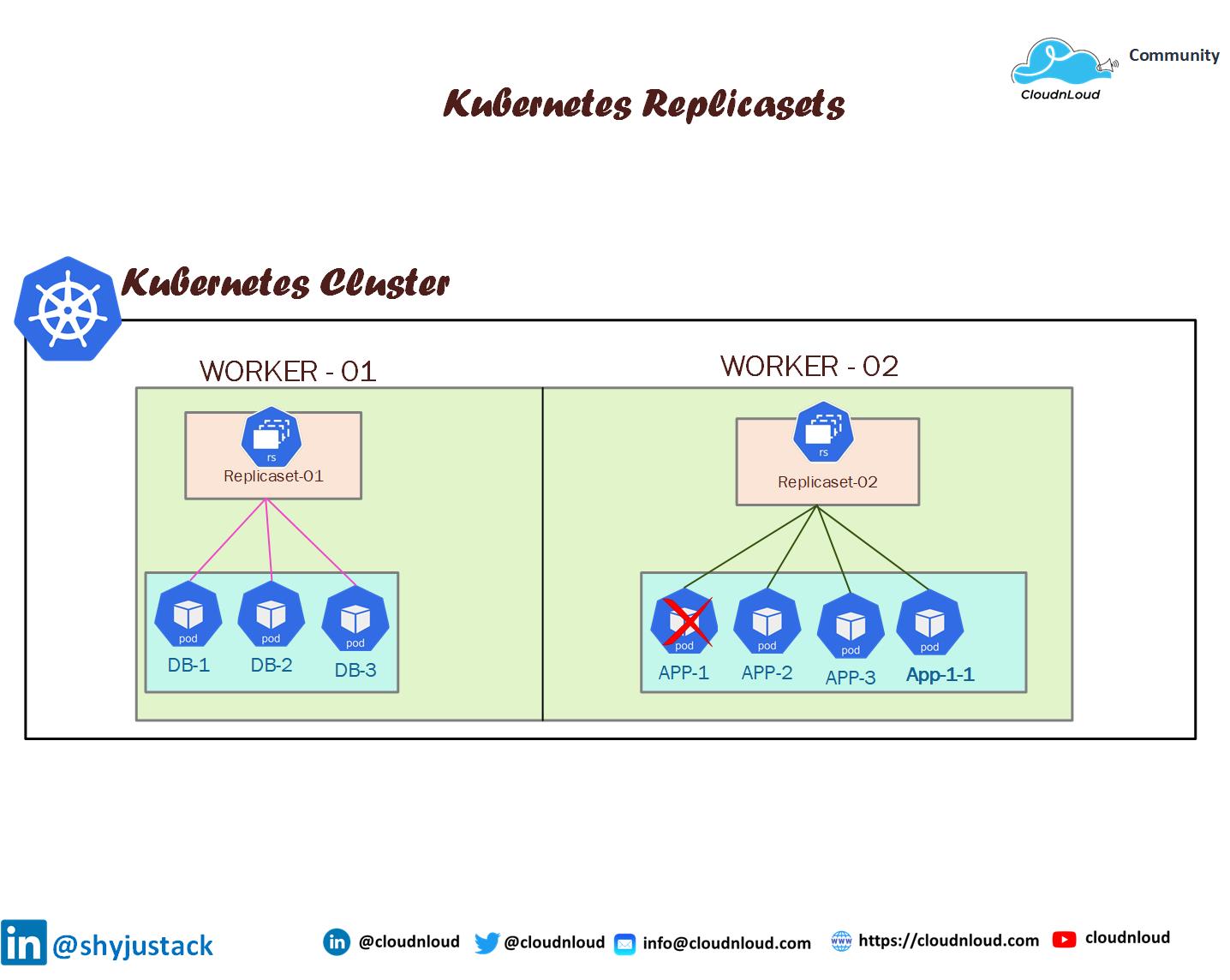
What is ReplicaSet ?
After reading this post you will be understanding the high level of Kubernetes Replicaset, its advantages of this, and basic kubectl commands related to replicaset
If you have not yet checked the previous parts of this series, please go ahead and check this 👉Link
A ReplicaSet is a process that runs multiple instances of a Pod and keeps the specified number of Pods constant. Its purpose is to maintain the specified number of Pod instances running in a cluster at any given time to prevent users from losing access to their application when a Pod fails or is inaccessible.
ReplicaSet helps bring up a new instance of a Pod when the existing one fails, scale it up when the running instances are not up to the specified number, and scale down or delete Pods if another instance with the same label is created. A Replicaset ensures that a specified number of pod replicas are running continuously and helps with load-balancing in case of an increase in resource usage.
- It uses labels to select pods that it should be managing.
- A pod must be labeled with a matching label to the ReplicaSet selector, and it must not be already owned by another controller so that the ReplicaSet can acquire it.
- ReplicaSets can be deleted with or without deleting their dependent pods.
- You can easily control the number of replicas (pods) the ReplicaSet should maintain through the command line or by directly editing the ReplicaSet configuration on the fly.
- Usage of the application we can scale up and down the number of replicas on the fly
- ReplicaSet is the new method of use to setup replication. Technically it has replaced ReplicationController which was used in old technology.
Overview of replicasets
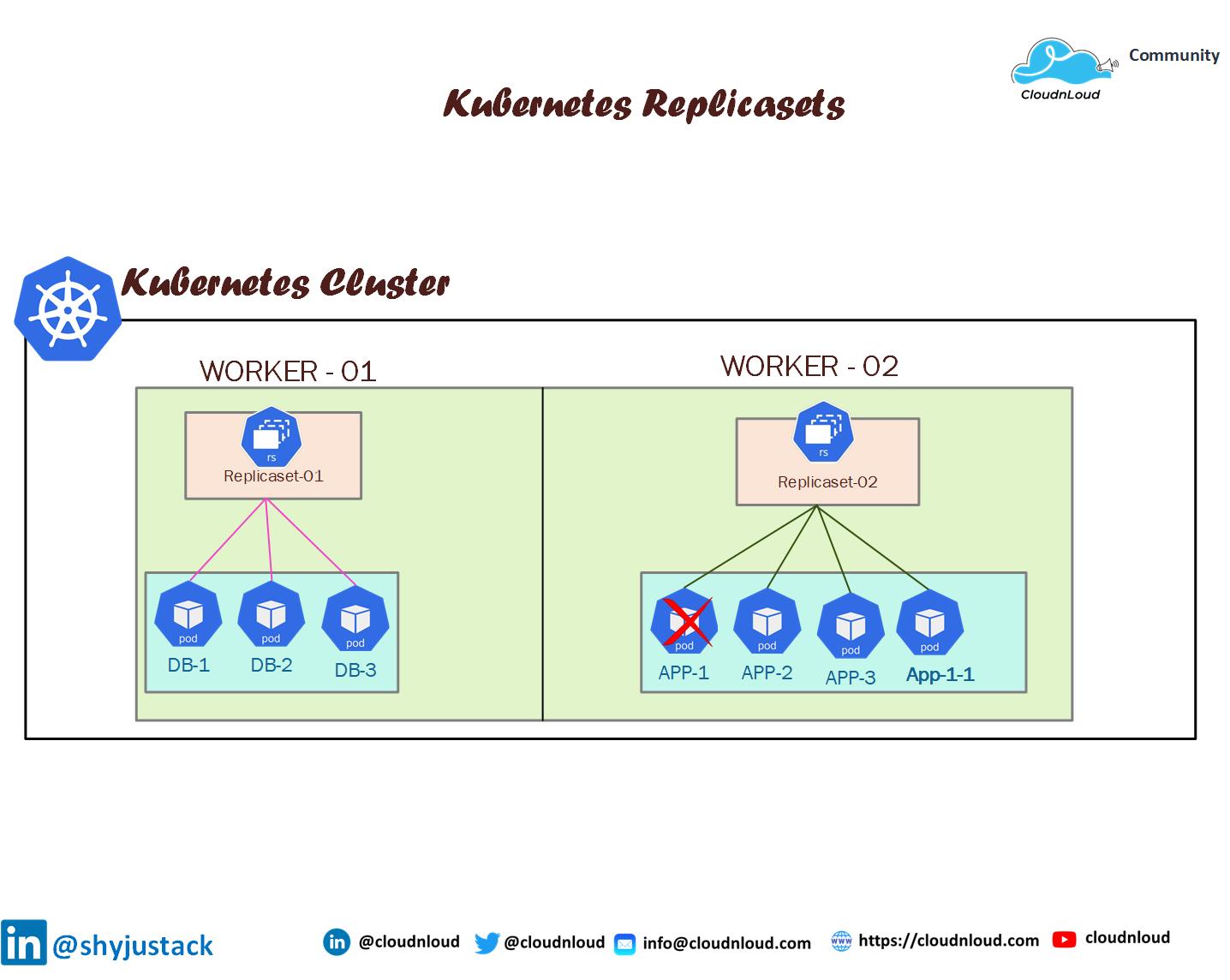
👌Replicaset you can short to rs
Deploying a Sample ReplicationSet in Kubernetes
apiVersion: apps/v1
kind: ReplicaSet
metadata:
  name: nginx-proxy
  labels:
    app: nginx-proxy
    tier: frontend
spec:
  # modify replicas according to your case
  replicas: 3
  selector:
    matchLabels:
      tier: frontend
  template:
    metadata:
      labels:
        tier: frontend
    spec:
      containers:
      - name: nginx
        image: nginx
Creating the replica set
kubectl create -f replica.yaml
replicaset.apps/nginx-proxy created
You can then get the current ReplicaSets deployed:
kubectl get replicaset
You can also check on the state of the ReplicaSet:
root@Kubernet-Master:~# kubectl describe replicaset nginx-proxy
Name:         nginx-proxy
Namespace:    default
Selector:     tier=frontend
Labels:       app=nginx-proxy
              tier=frontend
Annotations:  <none>
Replicas:     3 current / 3 desired
Pods Status:  3 Running / 0 Waiting / 0 Succeeded / 0 Failed
Pod Template:
  Labels:  tier=frontend
  Containers:
   nginx:
    Image:        nginx
    Port:         <none>
    Host Port:    <none>
    Environment:  <none>
    Mounts:       <none>
  Volumes:        <none>
Events:
  Type    Reason            Age    From                   Message
  ----    ------            ----   ----                   -------
  Normal  SuccessfulCreate  2m41s  replicaset-controller  Created pod: nginx-proxy-qcmdj
  Normal  SuccessfulCreate  2m41s  replicaset-controller  Created pod: nginx-proxy-5qfzp
  Normal  SuccessfulCreate  2m41s  replicaset-controller  Created pod: nginx-proxy-pgbfk
Scale Up the ReplicaSet
kubectl scale --replicas=5 -f replica.yaml
output
NAME          DESIRED   CURRENT   READY   AGE
nginx-proxy   5         5         5       102m
Scale down the Replicaset
kubectl scale --replicas=3 -f replica.yaml
output
NAME          DESIRED   CURRENT   READY   AGE
nginx-proxy   3         3         3       103m
Is Our ReplicaSet the Owner of Those Pods?
kubectl get pods nginx-proxy-5qfzp -o yaml | grep -A 5 owner
Output is showing this pod is part of nginx-proxy replicaset
root@Kubernet-Master:~# kubectl get pods nginx-proxy-5qfzp -o yaml | grep -A 5 owner
  ownerReferences:
  - apiVersion: apps/v1
    blockOwnerDeletion: true
    controller: true
    kind: ReplicaSet
    name: nginx-proxy
root@Kubernet-Master:~#
Removing a Pod From a ReplicaSet
kubectl edit pods nginx-proxy-pgbfk
output

Change the pod label to be role

Deleting Replicaset
kubectl delete rs nginx-proxy (replicaset name)
or
kubectl delete -f replica.yaml
Hope you have got an idea about Kubernetes Replicaset and how we can implement them in our product environments
Happy Learning 📚
Thank you!
About the author
My name is Shyju Krishnan having 10+ Years of experience as an IT infrastructure/Solution Architect
Comments
Join the discussionNo comments yet. Be the first to comment.
Kubernetes Deep Dive
In this series, i will brainstorm basic to advanced topics with examples,with commands,with usecases